
Indiana Property Search From Address to Record
An address works when you know the parcel's location. A name suits a hunt across the tax roll for a person or entity. A parcel key gives an exact match between offices. The statewide DLGF assessment form accepts all three. Recorder portals, though, are county-run, and some search by party name or instrument number instead of street. Every Indiana property search works best when one result supplies the next key.
- Choose the county and enter the street address in DLGF Assessment Search. If it fails, try the street name without its direction or type.
- Open the detail, then copy the parcel key, legal description, owner/taxpayer name and mailing address exactly as displayed.
- Carry the parcel key into the county GIS, tax bill and Sales Disclosure Search; keep the legal description for a recorder lookup.
- Search the county recorder’s grantor/grantee index under the current owner or the instrument number. Check the image tier and county coverage before relying on an index row.
- Record the assessment year and map/data date. Ask the county custodian for older material, a missing image, or a certified copy.
That DLGF result is a lead drawn from county data. It is not a title report, and the owner name or date may differ from the newest recorded instrument.
Indiana State and County Search Fields
The free DLGF Assessment Search form comes from the Department of Local Government Finance. It covers five assessment years. Pick the county and year first. One of owner, street, or parcel is required. Property type filters results; it cannot replace a search key. The same table also summarizes the statewide Sales Disclosure form and the common county-recorder fields, though actual county menus differ.
| Field | Control and requirement | Format or result note |
|---|---|---|
| Assessment Year | Dropdown, required or defaulted | 2025, 2024, 2023, 2022, 2021 appeared at inspection. |
| County | Dropdown, required or defaulted | All 92 Indiana counties. |
| Property Type | Optional dropdown | Agricultural, Commercial, Exempt, Industrial, Mineral Rights, Residential, Utility. |
| Property Owner’s Name (First Or Last) | Optional text, maxlength 50 | First or last name; trim extra spaces; partial text can help. |
| Property Street Address | Optional text, maxlength 50 | Use partial street text if a full address does not return a match. |
| Parcel Number | Optional text, maxlength 50 | Enter the county’s key; there is no one statewide format. |
| Search | Button | At least one owner, street or parcel key must be entered. |
| Details / Download | Result controls | Details opens the record; Download exports Excel, and a wide result may require a narrower query. |
| DLGF Sales Disclosure Search | ||
| SDF ID | Optional text | Exact sales-disclosure identifier. |
| Year / County | Optional dropdowns | Sales year and Indiana county. |
| Parcel # / Parcel Address / Zip Code / Tax District | Optional text | Property key and location or taxing-district fields. |
| Buyer’s Name - First / Last / Company | Three optional text inputs | Individual or company fields. |
| Seller’s Name - First / Last / Company | Three optional text inputs | Individual or company fields. |
| Preparer’s Name - First / Last / Company | Three optional text inputs | Filing preparer fields. |
| Sales Price (Min, Max) | Optional numeric pair | Lower and upper range. |
| Conveyance Date (Min, Max) | Optional date pair | Range for conveyance date. |
| Sale Date (Min, Max) | Optional date pair | Range for sale date. |
| Date Received (Min, Max) | Optional date pair | Range for date received by the system. |
| Transfer Date (Min, Max) | Optional date pair | Range for transfer date. |
| Valid for Trending / Property Class | Optional dropdowns | Dynamic options; property class uses a range. |
| Captcha Code | Text/image, when displayed | A refresh control appears with the challenge. |
| Search / Clear Fields / Export to Excel | Buttons | Search returns parcel, address, price and action; export works after narrowing. |
| County Recorder Index, where supported | ||
| Party or last name | Text, often required for name mode | Grantor and grantee may need separate searches; exact spelling can matter. |
| First/middle name; recorded date from/to | Optional text and date pair | Availability and labels vary by county or vendor. |
| Document type; instrument number; book/page | Optional dropdown/text fields | Current portals may use instrument numbers; older books use book/page. |
| Legal description / parcel key | Optional text | Lot/block or county-specific key; parcel search is not universal. |
| Address; Search / Reset / Browse | Optional text and buttons | Address search is not universal; vendor tools may add image, cart or print controls. |
That validation message also references a "neighborhood identifier." The form itself exposes no such separate field. Skip neighborhood searching unless a county system actually offers it.
Indiana Partial Street Searches Help
Insider tip: Try partial street text when a full address fails; DLGF itself recommends the trick. Drop the direction and street type first. Then narrow the county to shrink the result list. The situs label on file may differ from a mailing city, rural route, or older deed address.
One address can hide more than a house parcel. There may be a separate garage lot, several condo units, or nearby parcels with similar numbers. A blank result may also mean the county skipped that year, the portal expects another spelling, or the fields and layouts vary because the statewide form passes through county data.
Keep any parcel key exactly as shown. Punctuation and leading zeros matter. Indiana sets no single user-facing APN format across its 92 counties.
Carry the Parcel Key Across Indiana Systems
The parcel key joins state and county tools. Use it in the assessor card, county GIS, the tax bill, the Sales Disclosure Search, and any recorder portal that accepts parcels. Some recorder indexes refuse them. There, search by grantor or grantee name, legal description, book and page, or instrument number instead.
- Parcel key or APN
- A county-assigned identifier for an assessed parcel. Keep the exact text, punctuation and leading zeros.
- Situs address
- The physical location assigned to the property, which may differ from the tax-bill mailing address.
- Legal description
- The deed or plat wording that identifies land by lot/block, section-township-range or metes and bounds.
- Owner of record
- The name displayed in a county’s tax record, which can lag a newly recorded deed.
Parcels sometimes split or combine. An old key can vanish from the current map while living on in deed or tax history. Keep the legal description as a backup thread.
What an Indiana Parcel Card Shows
County detail formats vary, according to DLGF. A result may join owner and value fields with a parcel key, address, legal description, deductions, tax district, and links to maps or sketches. Read the county card for exact labels. Check its assessment year and source date there. No statewide search can promise every county displays every item.
| Owner or taxpayer | The county’s current tax-roll name, with its displayed data year. |
|---|---|
| Mailing address | Where notices go; it may belong to a trust, lender, attorney or tax service. |
| Situs and parcel key | Physical address and exact local identifier; rural parcels may lack a standard street label. |
| Legal description | Subdivision/lot/block, section-township-range or metes-and-bounds text. |
| Assessment | Land, improvements, gross assessed value, deductions and net value for a stated year. |
| Property class | Statewide options include residential, agricultural, commercial, industrial, exempt, mineral rights and utility. |
| Physical traits | Some county cards show area, grade, condition, year built, rooms, sketch or outbuildings. |
| Sale and map links | Some county systems show sales history, GIS, aerial or a property-record-card PDF. |
A tax card is not a title report. It omits recorded claims and cannot establish marketable title. A sale-history field may sit blank even when a deed exists, and the current balance belongs to the treasurer. Treat any result as a dated parcel record, not a full story of the land.
Indiana County Recorder Search Needs a Name
Carry the assessor's exact owner spelling to the county recorder. Search the party as grantor and as grantee where the system permits. Narrow the hits with recorded date, document type, instrument number, or legal description. Address search is spotty in Indiana recorder portals. The assessor key is usually the better bridge.
A deed entry may show only a document number and recording date, not the full instrument. Wabash County offers a free filing-only search. Image access there is paid. Other counties mix Tapestry, Laredo, local software, and public terminals differently, and the Wabash recorder page is one example, not a statewide rule.
For the deed workflow and copy routes, see the Indiana deed records page. Match the legal description first.
The recorder's access example shows the point. A result row and a document image are separate steps.
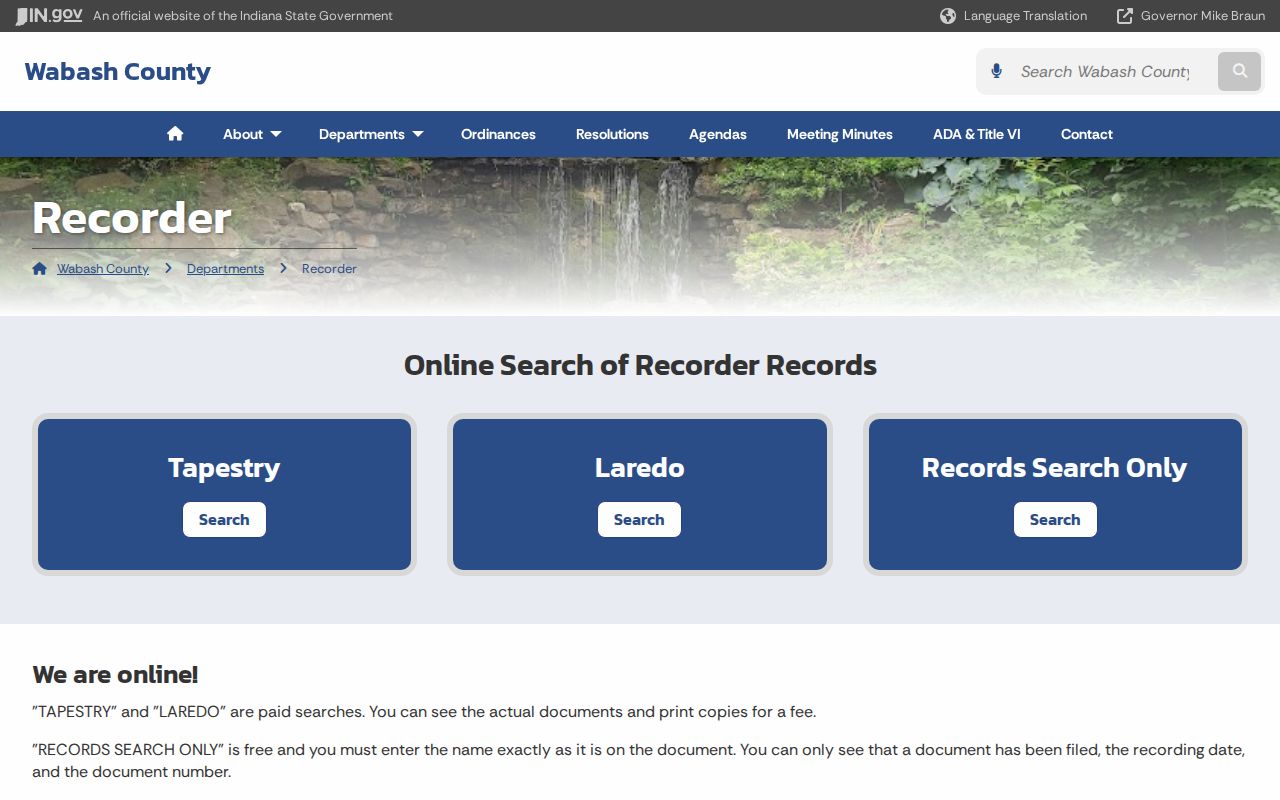
Deed images come only from the parcel's own county office.
Indiana Sales Disclosure Separates Dates
Indiana's Sales Disclosure Search accepts many filters. You can narrow by SDF ID, county, parcel, buyer, seller, preparer, address, ZIP, tax district, price range, property class and several date ranges. The dates are not interchangeable. Conveyance date, sale date, date received and transfer date each sit in their own field. Pick the one that actually answers your question instead of calling every date "the sale."
The current DLGF Sales Disclosure Search links data from before January 1, 2021 to a retired site. The live page offers a year and county selector. It also has dynamic "Valid for Trending" toggles, property-class choices, CAPTCHA when it appears, plus search, clear and Excel-export buttons. Results show parcel, address and price. County submissions can be incomplete, though. What you get is a sales-disclosure record. It is not an appraised value or a full deed image.
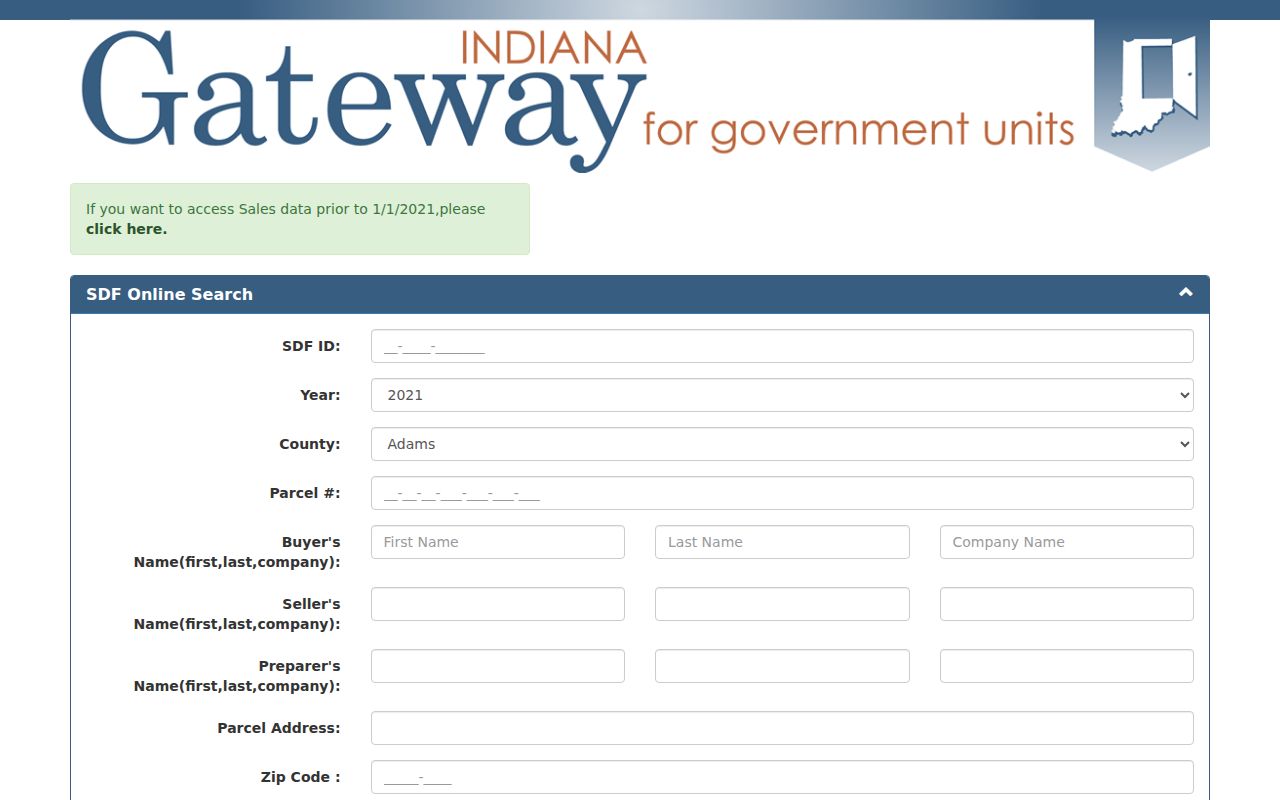
Note: Check the record's price and date fields against the deed and the assessment year before comparing values.
Indiana Gateway Property Files Are Snapshots
Indiana Gateway publishes downloadable property files with selectors for dataset, year and geography. A bulk file suits a county-wide or year-based view of property records. It is not a live owner or title feed. The page represents each county's most recent compliant dataset. Read any file with its field layout. Note its data year.
The Gateway property-file page is separate from the record-by-record DLGF Assessment Search. Note the download date. Note the geography and the year you chose. When a file and a county card disagree, let the county assessor or auditor step in. Let that office settle the current parcel record. The download controls let you set a dataset, year and geography. They cannot promise that every county supplied the same fields.
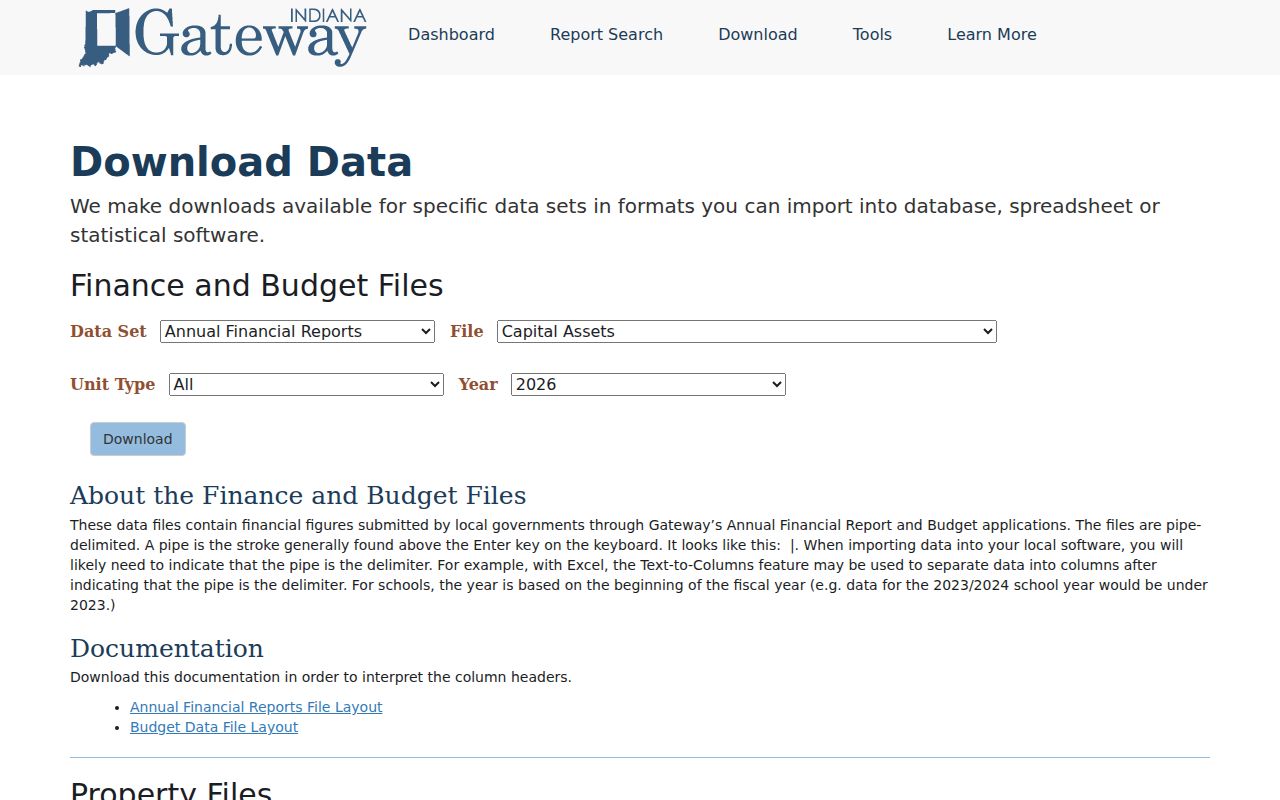
Use this route for a data extract; use the county portal for an individual parcel's latest detail.
Indiana Entity Owners Need Exact Names
A county card may list an LLC instead of a person's short name. The same goes for a trust, estate, executor or trustee. Search the legal entity exactly as written. Then try punctuation and suffix variants. Indiana's INBiz Business Search checks an entity name, ID or filing number, and it returns registered agent, incorporator or governing person, type, status, street, city and ZIP.
INBiz can explain a grantee's filing name or registered-agent address. It cannot prove the entity owns the parcel. Compare the exact legal name and the deed against the assessor card. A registered-agent address is rarely the parcel's tax mailing address. For an estate, look for the fiduciary and any probate or transfer filing. Never read a homestead deduction as proof someone lives there. It only shows the deduction was applied to the tax record.
When Indiana Search Finds No Record
A blank result has many causes. Spelling, a changed street name, an old parcel key or a vendor cutoff can all hide the hit. A missing county submission can too. So can a record that is simply not online. Recheck the address without direction or street type. Test the owner's exact legal name. Confirm the county before switching systems. For a split or merged lot, bring the legal description and older parcel identifiers too.
If the portal dead-ends, contact the county recorder, assessor, auditor or treasurer that holds the record. Ask about a public terminal, older index books, microfilm, a mail copy request or the right office for a transferred series. A narrow Indiana APRA request can name the address, parcel, instrument or record type and date range. The custodian does not have to build a new parcel history for you.
For a parcel map or adjacent-lot question, the Indiana neighbor lookup page shows how to pair county GIS and assessor searches.
Indiana Directories Can Resolve Old Addresses
An old directory or plat can link a changed street name to a current parcel. It cannot establish ownership by itself. The Indiana State Library's county-organized city-directory guide identifies which volumes and scans exist. Its county maps, atlases and plat books are another route. They can clarify a legal description that no longer resembles a modern address.
Treat a directory as a name-and-address lead only. Confirm the address on a map, then search the county recorder's index. A printed volume may not be online. In that case, ask the State Library or a local library about the Indiana Collection, microfilm, reverse directories and reference help. Record the book title, year, page and scan link. That way the lead can be verified later.
The Indiana city-directory guide and county map and plat guide are historical lookup routes. They are not deed indexes.
Indiana Property Search by Three Keys
Match the search key to your starting point. An address works well for a known property. Rural records and older deed records can spell it differently. An owner-of-record name may surface more than one parcel. Entities and same-name owners demand care. A parcel number is the most precise handoff once a county tool supplies it.
| Search Key | Best For | Where It Works | Watch Out |
|---|---|---|---|
| Address | Locate a known site or begin a map search | DLGF Assessment Search and county assessor/GIS | Try partial street text; mailing city and situs may differ. |
| Owner name | Find tax parcels tied to a person or entity | DLGF owner field and county recorder party index | Test exact LLC, trust, estate and spelling variants. |
| Parcel number | Match a specific record across systems | Assessor, GIS, tax bill and Sales Disclosure | Keep local punctuation and leading zeros. |
Not a title search. An Indiana property search shows records that a system returned, not every possible claim or later filing. It does not guarantee clear title; use the recorder’s documents and qualified title help when a purchase depends on a complete search.